
Who this workflow is for
This article explains how rights holders and staff can submit URLs they discover to PiracyTakedown for processing. Sign in, open the relevant product under “My products,” and select “Submit URLs.” See the user manual for the current workflow.
Labels and available screens may vary with your account and the interface in service. If the instructions do not match what you see, contact us.
1. Select or register the product
Open the relevant product in the dashboard. If it has not been registered, check its title, legitimate product URL, and rights information before adding it. Confirm that you have selected the right work and rights holder.
2. Enter the URLs
Use the product’s manual URL submission screen and enter one URL per line. Distinguish direct file-host links from pages containing those links. A linking page needs to be crawled before extracted file links can enter subsequent processing, so a hosted file may not appear immediately after submission.
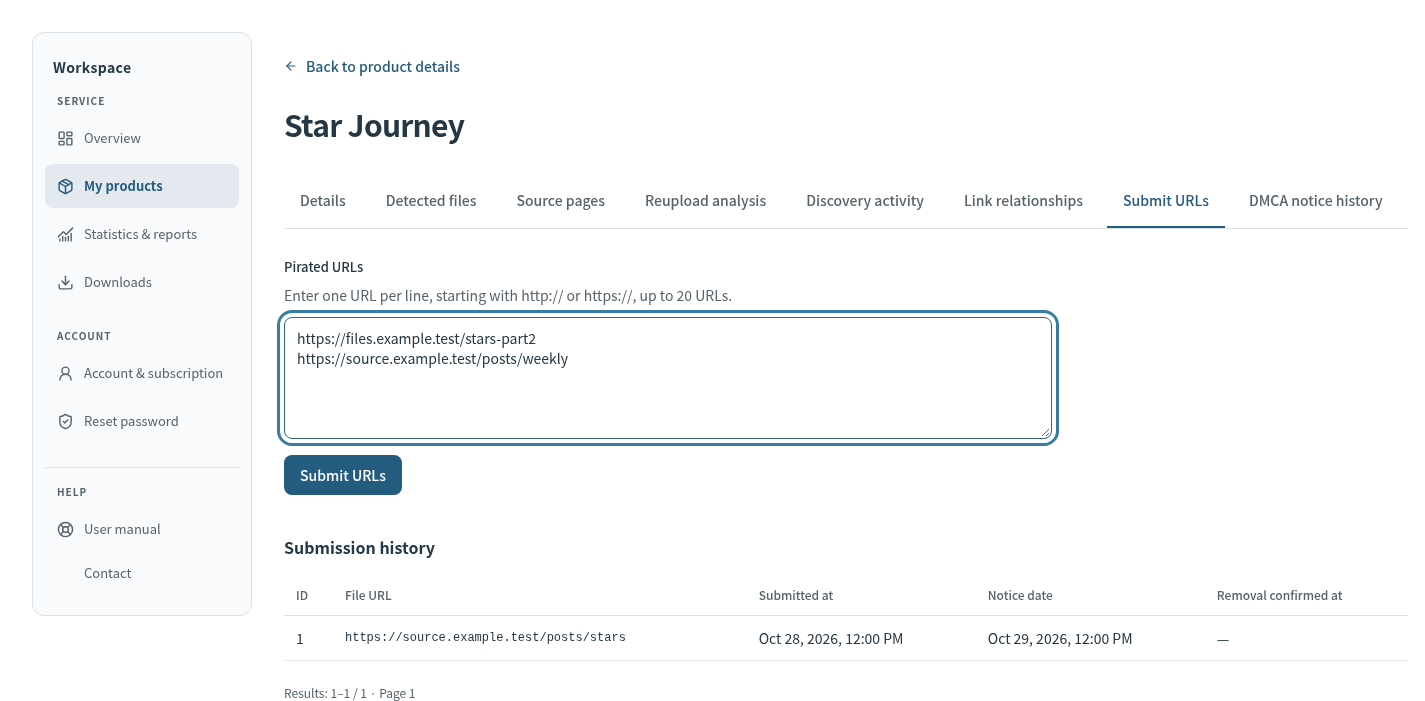
3. Review before submitting
Check the work, lack of authorization for the distribution, your authority to send a notice, and the contact details. Manual submission does not itself establish infringement. Review the entries, then select “Submit URLs.” You can submit up to 20 URLs at once. URL submission and sending a takedown notice are separate steps.
4. Track progress
Distinguish discovery, waiting for a notice, notice sent, and confirmed removal. Registering a URL, having a notice received, and removing a file are different stages. The original article’s “one to two days” estimate is not a current processing guarantee.
See the user manual for the workflow and preparing a DMCA notice for the required information.